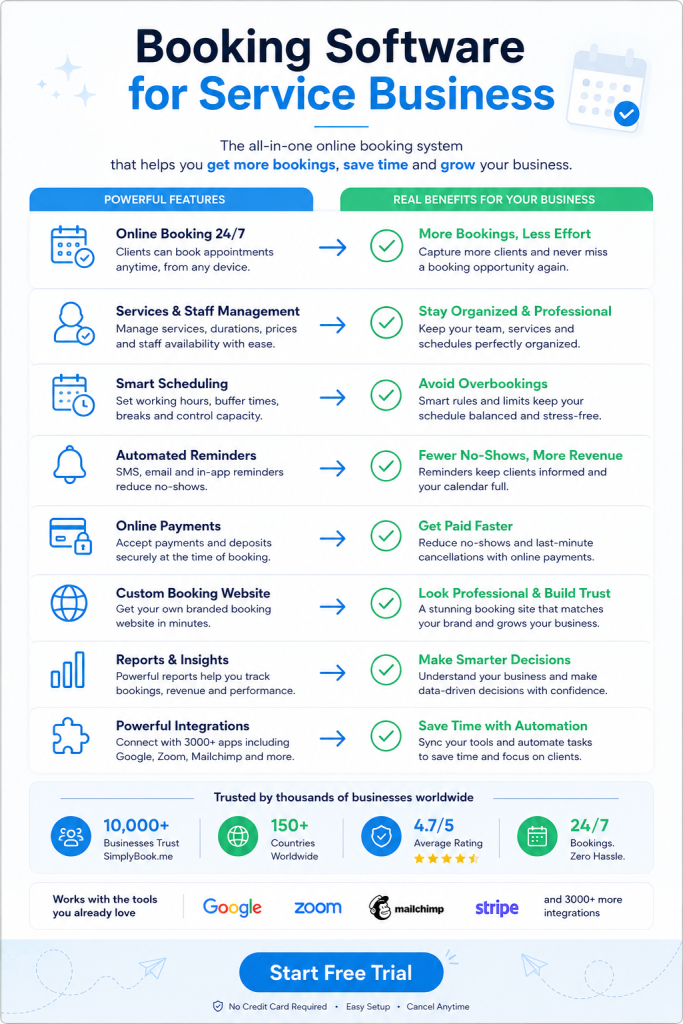
A client calls to book an appointment and you’re with another customer. They hang up. You just lost a sale. Booking software for service business prevents exactly this problem. It works while you sleep.
Why Booking Software for Service Business Changes How You Get Clients
Most service businesses lose money during closed hours. Someone wants a haircut at 11pm. Another person needs a massage consultation during their lunch break. Your phone sits silent.
Online booking systems accept appointments around the clock. Clients schedule when it suits them. You wake up to a full calendar.
The software sends automatic confirmations immediately. No waiting for callbacks. No phone tag. Clients get instant proof their slot is reserved.
This matters more than you think. People book services on impulse. They search for a therapist at midnight. They need a plumber on Sunday morning. The first business that lets them book wins.
How Booking Software for Service Business Handles Payment Problems
No-shows cost service businesses thousands each year. Someone books a two-hour session. They forget. Your time slot stays empty.
Modern booking platforms require deposits upfront. Clients pay a percentage when scheduling. This filters out people who aren’t serious.
You can also accept full payments during booking. Hair salons do this for packages. Consultants charge before discovery calls. The money hits your account before the appointment starts.
Payment integration connects directly to processors like Stripe and PayPal. No separate invoicing needed. The booking triggers the charge automatically. Clients see one simple checkout flow.
Some businesses prefer in-person payments. The same system tracks those too. You mark cash or card payments after the service. Everything stays in one place for accounting.
Reminder Systems That Actually Get People to Show Up
Text messages work better than emails for reminders. People read texts within three minutes. Emails sit unread for days.
Good booking software sends SMS reminders automatically. One notification goes out 24 hours before. Another reminder hits two hours prior. Clients can’t claim they forgot.
WhatsApp reminders work even better in some markets. The message feels more personal. Clients can reply directly with questions. You answer from the same platform.
The system also notifies you when bookings change. Someone cancels? You get an instant alert. A new appointment comes in? Your phone buzzes immediately.
This saves hours of manual reminder work. You’re not texting clients yourself. You’re not sending individual emails. The software handles every notification without your input.
Calendar Integration Stops Double Bookings
You book a client through your website. Another books via phone. Both want the same time slot. Now you’re apologizing and rescheduling.
Syncing with Google Calendar or Outlook prevents this. The booking system checks your calendar in real time. Blocked times become unavailable automatically.
This works both ways. Block time in your personal calendar for a dentist appointment. The booking system won’t offer that slot to clients. Your private commitments stay protected.
Multiple staff members need this even more. Each person has their own calendar. Clients see only the available times for their chosen provider. No confusion about who’s free when.
Mobile Apps Put Your Booking Software for Service Business in Clients’ Pockets
Websites work fine on phones. But apps feel more professional. Clients see your icon on their home screen daily.
Some booking platforms let you brand a client app. Your logo appears when they open it. Your colors fill the interface. It looks like you built custom software.
Clients use the app to reschedule without calling. They view their appointment history. They rebook the same service with one tap. Everything happens without your involvement.
You get an admin app too. Check today’s schedule from anywhere. View client details before appointments. Accept or decline booking requests on the go.
Push notifications alert you through the app. You don’t need to check your dashboard constantly. New bookings reach you wherever you are.
Where Clients Can Book Beyond Your Website
Your website might get 50 visitors per week. Your Facebook page gets 500. Why not accept bookings on both?
Modern systems embed booking directly into Facebook business pages. Clients schedule without leaving the platform. Instagram profiles can link to booking pages too.
Google My Business integration matters most for local services. Someone searches for “massage near me”. They see your listing. They book directly from Google search results.
This multiplies your booking channels without extra work. One calendar controls all sources. Double bookings stay impossible. Updates to your services appear everywhere at once.
Custom Features That Match Different Service Types
Fitness studios need class booking with capacity limits. One yoga session fits 15 people. The 16th person sees it’s full.
Medical practices need intake forms before appointments. New patients fill out health history. The information reaches you before they arrive.
Salons benefit from resource management. One stylist needs a specific chair. Another requires the coloring station. The system assigns both the person and the equipment.
Service packages work for spas and therapy practices. Clients buy five sessions at a discount. They book from their package until it’s depleted. The software tracks remaining sessions automatically.
Gift cards and coupons bring new clients. Someone receives a massage gift card. They redeem it during online booking. The discount applies without manual intervention.
Managing Multiple Locations with Booking Software for Service Business
Expanding to a second location doubles your scheduling complexity. Staff work at different addresses. Clients need to choose the right place.
Location-based booking handles this cleanly. Clients select their preferred spot first. Then they see only the staff and times available there. No confusion about where to show up.
Each location can have different services. Your downtown office offers premium treatments. Your suburban spot handles standard appointments. The booking flow adjusts based on the chosen location.
You view all locations from one dashboard. Today’s schedule shows both offices. Tomorrow’s bookings appear side by side. Reporting combines data across locations or breaks it down individually.
Data and Reports That Show What Actually Works
Which service brings the most revenue? What time slots fill fastest? Most businesses guess. Smart ones check their data.
Booking software tracks every metric automatically. You see total bookings per month. You compare this month to last month. Growth becomes visible in actual numbers.
Popular services rise to the top of your reports. You notice couples massages outperform individual sessions. Now you know where to focus marketing efforts.
Peak booking times emerge from the data. Most clients want Thursday evenings. Few book Monday mornings. You adjust staff schedules to match demand.
Client retention appears in the numbers too. How many people book a second time? How many become regular clients? These metrics tell you if your service quality matches your marketing.
Switching to New Booking Software for Service Business
Moving from paper scheduling feels overwhelming. You have existing appointments. You have regular clients with preferences. Everything needs to transfer.
Most platforms include migration support. The company helps move your current schedule. Client data imports from spreadsheets. Previous appointments transfer into the new system.
Your clients need to know about the change. The software can notify them automatically. They receive instructions for booking online. They get login credentials for the client portal.
Start with a soft launch. Keep your old method running briefly. Accept bookings through both systems temporarily. Once you trust the new platform, shut down the old process completely.
Staff training matters here. Everyone needs to check the same calendar. Everyone needs to update client notes correctly. A week of parallel systems helps people adjust. Then you commit fully.
Pricing Models and What You Actually Pay
Some booking systems charge flat monthly fees. Others scale based on booking volume. The second option suits new businesses better.
You pay less when starting out. As appointments increase, the cost rises gradually. This matches your revenue growth. You’re not paying for unused capacity.
Feature-based pricing adds cost for advanced tools. Basic scheduling stays cheap. Add payment processing and the price increases. Include SMS reminders and it goes up again.
Free trials let you test before committing. Most platforms offer 14 days without payment details. You set up your services. You test the booking flow. You decide if it fits your needs.
Watch for hidden transaction fees. Some systems take a cut of each payment. Others charge separately for SMS messages. Calculate total cost including these extras.
Security and Compliance for Client Information
You collect personal data during booking. Names, phone numbers, email addresses. Health information for medical services. This data needs protection.
Reputable platforms use encryption for all stored information. Client details stay secure on protected servers. Payment data never touches your own systems.
HIPAA compliance matters for healthcare providers. Mental health therapists need this. Chiropractors need it too. Some booking platforms offer HIPAA-compliant plans specifically.
Data backup happens automatically. Server failures won’t erase your schedule. Client information survives technical problems. You never lose appointment history.
Access controls let you limit who sees what. Receptionists access the schedule but not payment details. Accountants see financial reports but not client notes. Each team member gets appropriate permissions.
Review Collection That Builds Your Reputation
Happy clients forget to leave reviews. They meant to write something nice. Life got busy. The moment passed.
Automatic review requests catch people at the right time. The system sends a feedback request two hours after the appointment. The experience stays fresh in their mind. They’re more likely to respond.
The request links directly to Google reviews. One click takes them there. No searching for your business. No friction in the process.
You can display reviews on your booking page. New clients see social proof before scheduling. Five-star ratings increase conversion rates. People trust businesses with visible positive feedback.
Negative reviews come too sometimes. You see these privately first. You get a chance to address the issue before it goes public. Some problems get resolved before becoming permanent feedback.
AI Features Entering the Booking Space
Voice booking lets clients schedule by phone without human staff. They call a number. An AI assistant answers. It checks availability and books the appointment.
This sounds futuristic but exists now. The technology understands natural language. Clients speak normally. The AI asks clarifying questions when needed.
Chatbots handle similar tasks through text. Someone visits your website at 3am. They type questions about your services. The bot answers instantly and offers booking options.
AI can also suggest optimal appointment times. It learns when clients prefer to book. It notices gaps in your schedule. It subtly promotes underbooked time slots.
These features still need human oversight. Technology fails sometimes. You need backup plans. But the direction is clear. Automation handles more booking tasks each year.
Start with a free trial today and see your no-show rate drop within the first week.
Frequently Asked Questions
How long does it take to set up booking software?
Basic setup takes about 30 minutes. You add your services, set your hours, and configure availability. More complex features like payment processing or custom intake forms might need another hour. Most businesses go live the same day they start setup.
Can clients book without creating an account?
Yes, most booking systems allow guest checkout. Clients enter their name, phone, and email to book. They don’t need passwords or profiles. Account creation becomes optional for clients who want to track their booking history.
What happens if my internet goes down during business hours?
Your online booking page stays accessible since it’s hosted externally. Clients can still book while your internet is down. You can access your schedule through mobile data on your phone. The system continues working independent of your local connection.
Do I need technical skills to manage the software?
No coding or technical knowledge is needed. The interface works like any website you’ve used. Changing your hours takes a few clicks. Adding new services uses simple forms. Most platforms offer video tutorials for every feature.
Can I block off personal time in the calendar?
Yes, you can mark any time as unavailable. Block lunch breaks, personal appointments, or vacation days. Clients won’t see these slots as bookable. You control your calendar completely while the system handles the public-facing availability.