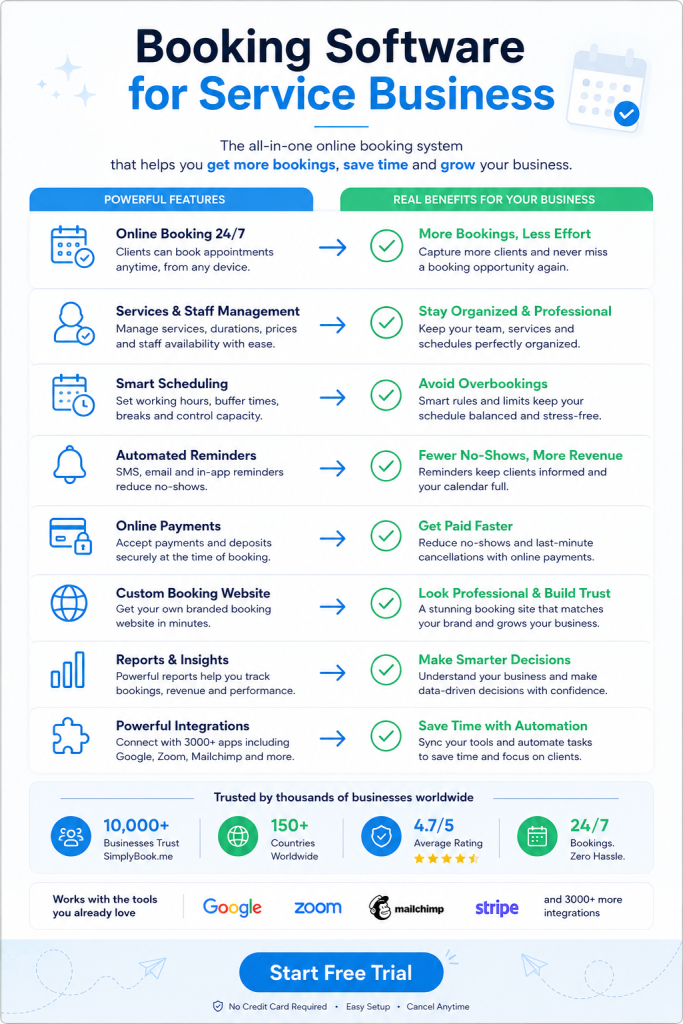
Your esthetician is mid-facial when the phone rings. Nobody answers. The caller books somewhere else. Booking software for spas fixes this problem by making 71% of clients less likely to abandon your business.
Why Spas Miss Revenue During Treatment Hours
Spas miss 30 to 40% of calls during peak hours. Your front desk person can’t be in three places at once. They’re checking in a client at the desk. Another guest is asking about packages. Meanwhile your massage therapist is 40 minutes into a 90-minute deep tissue session.
The phone rings.
80% of callers who reach voicemail don’t leave a message and simply call the next practice on their list. That’s not a scheduling problem. It’s revenue walking out the door before it ever walked in.
30 to 40% of calls come outside standard business hours when potential clients are researching and ready to commit, so if your phones go to voicemail at 6 PM you lose motivated callers. A booking system solves this by letting clients schedule appointments without ever picking up the phone. You can explore a flexible online booking system that handles appointments around the clock.
What Booking Software for Spas Actually Does
It’s not a digital calendar. It’s an intake and payment system that runs without staff. Clients book facials at midnight. They reschedule Saturday morning massages from their phone. The software confirms everything automatically.
86% of reviewers rate 24/7 online booking as important or highly important because it reduces phone calls and aligns with clients’ busy schedules. Good systems connect to your existing website. They also let people book through Instagram or Facebook. No separate login required.
The system sends reminders by text and email. Automated text and email reminders reduce no-shows, and 92% of reviewers rate this feature as important or highly important. When someone cancels at the last minute, the software can automatically notify waitlist clients.
This runs in the background while your team focuses on delivering treatments.
Payment Processing Built Into Booking Software for Spas
Taking deposits and processing payments shouldn’t need three different tools. The right software handles credit cards, Apple Pay, and Google Pay in one place. It also tracks what’s owed and what’s been paid.
Users find the POS system straightforward for processing payments and managing sales, and 92% of reviewers rated this feature as important or highly important. When someone books online, they can pay a deposit right there. No back-and-forth emails. No manual invoices.
Some platforms let you accept payments in person with card readers. Others connect to payment providers you already use. The key is syncing everything so you’re not reconciling five spreadsheets at month-end.
You also want options for memberships and packages. Recurring billing saves time. Clients sign up once and payments process automatically. This keeps your schedule full without constant outreach.
Custom Features That Improve Booking Software for Spas
Gift cards drive revenue during slow periods. When bookings drop, you can offer discounts and promotions. The software should track who bought what and when they need to use it.
Intake forms matter for spas. You need to know about allergies before a facial. You need medical history before certain treatments. Digital forms collect this information before the client arrives. Your esthetician reviews it ahead of time instead of scrambling during check-in.
Waiting lists fill last-minute cancellations. Someone drops their 2 PM appointment. The system texts three people on the waitlist. The first to respond gets the slot. You just filled what would have been dead time.
Some spas need HIPAA compliance for medical treatments. Others want to sell retail products during checkout. Look for a system that lets you add these features without switching platforms. SimplyBook.me is worth checking out as an appointment system with customizable features that grow with your needs.
How Multi-Location Spas Use Booking Software for Spas
Running two locations means coordinating staff across both sites. Booking software shows who works where and when. Clients can choose their preferred location during booking. The system only shows available times for that specific site.
You can assign therapists to different locations on different days. The calendar adjusts automatically. No double bookings. No confusion about who’s covering which location on Saturday.
Analytics show which location books more facials. Which one sells more packages. You see trends without running separate reports for each site. This helps you decide where to allocate marketing budget and staff resources.
Centralized management means you update pricing once and it applies everywhere. Same with service descriptions and promotional offers. You’re not maintaining five separate systems.
Integration With Tools You Already Use
Your spa probably uses QuickBooks for accounting. The booking system should export financial data directly into it. No manual entry. No copying and pasting transaction records.
Google Calendar sync prevents scheduling conflicts. When someone books through your website, it blocks that time on your personal calendar. You don’t accidentally schedule two appointments at the same time.
Facebook and Instagram integrations let people book without leaving social media. They see your post about a new treatment. They click “Book Now” and schedule right there. The fewer clicks between interest and booking, the more appointments you fill.
Some systems connect to email marketing tools. When someone books their first facial, they’re automatically added to your newsletter. You can send targeted promotions based on what services they’ve tried.
API access lets developers build custom connections. If you use specialized spa management software, you might need a custom integration. Look for platforms that support this.
Client Experience With Modern Booking Software for Spas
Your booking page should look like your brand. Colors, fonts, and images all match your website. Clients shouldn’t feel like they’ve left your site when they go to schedule.
Mobile matters more than desktop. Most people book from their phone. The interface needs to work perfectly on small screens. Big buttons. Simple navigation. Fast loading times.
Client profiles remember preferences. Someone always books the same massage therapist. The system suggests that provider automatically. They don’t have to dig through options every time.
Reviews and testimonials build trust. New clients can read what others said about your facials. They see real experiences before they book. This reduces hesitation and increases conversion.
The system should support multiple languages if you serve diverse communities. Spanish-speaking clients can book in their preferred language. Same with confirmation emails and reminders.
Pricing Models for Booking Software for Spas
Some platforms charge per booking. Others charge monthly based on features. The pricing often scales with your volume. Small spas pay less. Multi-location businesses pay more for advanced features.
Watch for hidden fees. Payment processing usually costs 2 to 3% per transaction. Some providers charge extra for SMS reminders. Others include them. Read the fine print before committing.
Free trials let you test the system. Fourteen days is standard. Use this time to set up your services. Book a few test appointments. Send reminders. Make sure everything works how you need it to.
Starting small makes sense. Choose a basic plan with core features. Add customizations as you grow. This approach keeps costs low while you’re building volume. A scalable booking platform adjusts pricing as your business expands.
Calculate the return. If the system fills three extra appointments per week, it pays for itself. Missing even one high-value client per month costs more than most software subscriptions.
Set up your booking system today and stop losing clients to voicemail.
Frequently Asked Questions
Can booking software handle group appointments like couples massages?
Yes. Most systems let you create services that book multiple people at once. You can set how many therapists are needed. The software blocks the right amount of time and resources automatically.
Do clients need to create an account to book appointments?
Not always. Many platforms allow guest checkout where clients enter their name and contact info without registering. Returning clients can create accounts to save preferences and view appointment history.
How do I prevent no-shows with booking software?
Require deposits or credit card holds during booking. Send automated reminders 24 and 48 hours before appointments. Set cancellation policies and fees. The system can charge no-show fees automatically if someone doesn’t cancel in time.
Can I block out time for breaks and staff meetings?
Yes. You can mark specific time blocks as unavailable. This prevents clients from booking during your lunch break. It also works for team meetings or when you’re doing inventory. The calendar simply won’t show those slots as available.
What happens if my internet goes down during business hours?
Cloud-based systems store your schedule online. You can access it from any device with internet. If your spa’s WiFi fails, use your phone’s data connection. Most platforms also have mobile apps that work as backup access points.