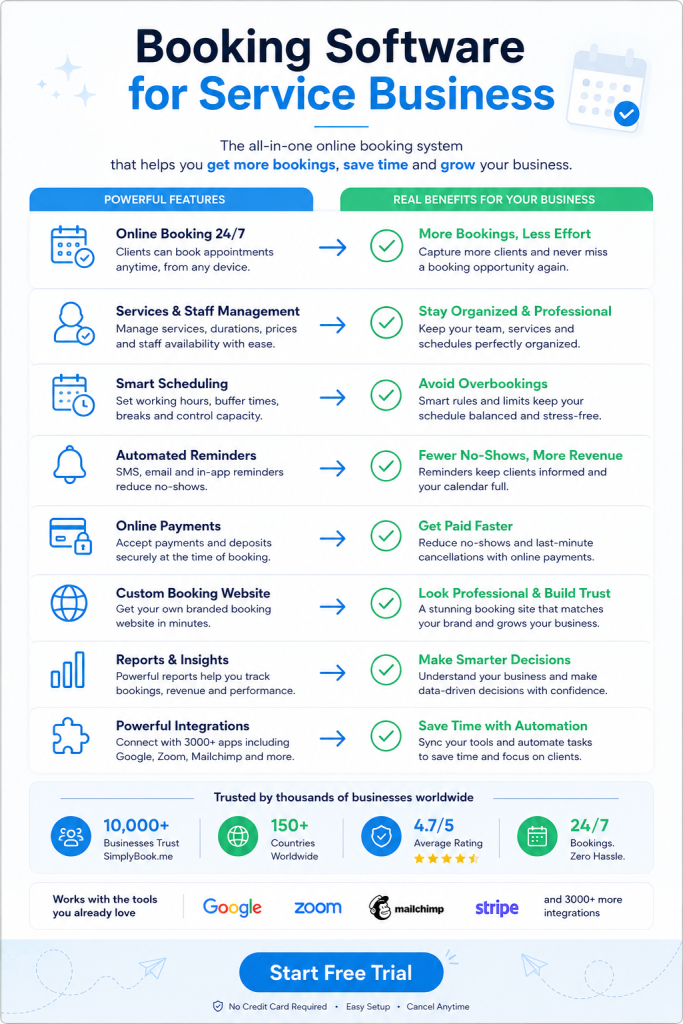
Author: Booking Software for Service Business

  • Stop Losing $5K Monthly to Manual Booking Admin

    Your calendar fills with back-to-back client calls and double bookings still happen. Manual scheduling eats up hours you could spend actually consulting. Booking software for consultants turns chaos into a system that runs itself. The right tool pays for itself in the first week.

    Why Booking Software for Consultants Solves the Scheduling Problem

    Consultants lose money every time they play email tag with prospects. A client wants Tuesday at 2pm. You’re already booked. Three emails later, you find a slot. The client picked someone else.

    Booking software shows your real availability in real time. Clients pick their own slot. No back and forth. No missed opportunities.

    You also stop the double booking nightmare. One system holds all your appointments. It blocks off time automatically. Your Google calendar syncs so personal commitments don’t conflict with client meetings.

    The time savings add up fast. Most consultants spend 5 to 10 hours per week on scheduling tasks. Software cuts that to under 30 minutes. You redirect those hours to billable work.

    Features That Actually Matter in Booking Software for Consultants

    Mobile booking comes first. Your clients book appointments from their phones during lunch breaks. Your booking page needs to load fast and look clean on small screens.

    Payment collection at booking time changes your cash flow completely. Clients pay deposits upfront through Stripe or PayPal. No-shows drop by 80% when money is on the line. You also eliminate the awkward payment conversation after each session.

    Automated reminders via email, SMS, and WhatsApp keep clients on track. The system sends a confirmation immediately after booking. It sends another reminder 24 hours before the appointment. You can customize these messages to match your brand voice.

    Calendar integration with Google or Outlook prevents conflicts across your entire schedule. Block off personal time in one place. It appears as unavailable everywhere. Add a client meeting in your booking system. It shows up in your main calendar instantly.

    Custom intake forms gather information before the first call. You ask specific questions about their business, challenges, and goals. Clients fill these out during booking. You review their answers before the meeting and show up prepared.

    How Strategic Consultants Use Booking Software for Consultants

    Strategy consultants typically offer different session types at different price points. A 30-minute discovery call costs nothing. A 90-minute deep dive session costs $500. A full-day workshop runs $3,000.

    You set up each service type separately in your booking system. Each one has its own duration, price, and availability rules. Discovery calls only happen on Tuesday and Thursday mornings. Deep dives get scheduled any weekday afternoon. Workshops need two weeks advance notice.

    This structure guides clients through your service ladder naturally. They book the free call first. During that call, you recommend the right next step. They book it immediately while motivation is high.

    Some consultants block buffer time between appointments automatically. A 60-minute session actually blocks 75 minutes on your calendar. You get 15 minutes to write notes and decompress. The system handles this math without you thinking about it.

    Marketing Consultants and Multi-Channel Booking

    Marketing consultants need booking options everywhere their audience hangs out. Your website is obvious. But clients also find you on LinkedIn, Instagram, and Facebook.

    Modern booking systems let people schedule from any platform. You embed a booking button on your Facebook business page. Instagram followers click the link in your bio. LinkedIn connections book directly from your profile. All appointments flow into one master calendar.

    This multi-channel approach catches clients in the moment of interest. Someone reads your LinkedIn post about content strategy. They want help right now. One click takes them to your calendar. Two minutes later, they’re booked.

    You can also create custom booking links for different marketing campaigns. Your email newsletter gets one link. Your podcast guest appearances get another. You track which channels drive the most bookings and double down there.

    Managing Client Relationships Through Your Booking System

    Your booking system becomes your client database over time. Every person who books leaves their contact information. The system stores their appointment history, services purchased, and total spending.

    You see patterns you’d otherwise miss. Sarah books quarterly strategy sessions like clockwork. Mark keeps rescheduling at the last minute. Jennifer referred three new clients in two months.

    This data helps you treat different clients differently. Sarah gets early access to your new workshop. You send Mark a gentle email about your cancellation policy. Jennifer receives a thank-you gift card.

    Automated follow-up sequences happen without manual work. The system sends a feedback request two days after each appointment. It asks clients to leave a review. Positive reviews appear on your booking page. Future prospects see social proof from real clients.

    You can also set up recurring appointments for retainer clients. They book the same time slot every week or month. The system creates all future appointments automatically. Clients get reminders. You never think about it again.

    Pricing Models and Payment Features in Consultant Booking Tools

    Most booking systems charge based on monthly booking volume. You pay more as you book more clients. This scales naturally with your business growth.

    Free plans typically allow 50 to 100 bookings per month. That works for new consultants building their practice. Paid plans start around $10 to $20 monthly and remove limits.

    The payment processing feature costs extra but saves massive headaches. Clients enter their card details during booking. The system charges them immediately or at appointment time. Money hits your account within days.

    You can require full payment upfront for shorter sessions. Longer engagements work better with deposits. Charge 50% at booking and collect the rest after delivery. The system handles both scenarios automatically.

    Some consultants use gift cards as a referral tool. A happy client buys a gift card for a colleague. That colleague books using the card. You get a new client. The referrer feels generous. Everyone wins.

    Technical Requirements and Integration Options

    Your booking system needs to connect with tools you already use. Most platforms offer native integrations with popular business software.

    Accounting integrations with QuickBooks or FreshBooks sync payment data automatically. Every booking creates an invoice. Every payment records as income. Your books stay current without manual data entry.

    Email marketing platforms like Mailchimp or ConvertKit add new bookers to specific lists. Someone books a discovery call. They join your prospect nurture sequence. Someone becomes a paying client. They move to your client newsletter list.

    Video conferencing tools like Zoom generate unique meeting links for each appointment. The booking confirmation email includes the Zoom link. Clients click and join at appointment time. No separate calendar invite needed.

    WordPress sites can embed booking forms directly into pages. Your services page shows available times right there. Visitors book without leaving your site. The experience feels native and professional.

    Customization and Branding Opportunities

    Your booking page represents your consulting brand. It needs to look like an extension of your website. Generic booking pages scream amateur.

    Good systems let you customize colors, fonts, and logos completely. You match your brand guidelines exactly. Clients see a consistent experience from your marketing to booking to delivery.

    Email and SMS notifications need customization too. The default “You have an appointment” message sounds robotic. Write something in your voice. Add a personal note. Include preparation instructions.

    Confirmation emails can include links to helpful resources. Someone books a branding consultation. The confirmation links to your brand questionnaire and three relevant case studies. They arrive informed and ready to work.

    Choosing the Right Platform for Your Consulting Practice

    Start by listing your non-negotiable features. You might need video call integration, payment processing, and multi-location support. Other consultants need class scheduling, package deals, and waiting lists.

    Test the mobile experience before committing. Book a fake appointment on your phone. Is it fast? Does it look professional? Would your ideal client complete this process? If you spot friction, they’ll abandon it.

    Read reviews from other consultants in your niche. Career coaches have different needs than IT consultants. Find people doing similar work and learn from their tool choices.

    SimplyBook.me offers a complete solution built for service professionals. It includes online booking, automated reminders through WhatsApp and SMS, secure payment processing, and a branded client app for your business. The platform handles multiple locations, syncs with your existing calendar, and grows as your practice expands.

    Most platforms offer free trials without requiring credit cards. Spend two weeks actually using the system. Set up your services. Send test bookings to friends. Experience the client side and admin side fully.

    Price matters but shouldn’t be the deciding factor. Cheap tools that frustrate clients cost more than premium tools that convert. Calculate the value of one additional booked client per month. The software likely pays for itself many times over.

    Common Mistakes Consultants Make With Booking Systems

    Offering too many appointment types confuses potential clients. You list 12 different service options. People freeze and book nothing. Start with three clear choices. Add more only when clients specifically request them.

    Making availability too limited backfires. You only offer Tuesday mornings. Half your prospects can’t make that work. They book with a more flexible competitor. Open up more slots even if they feel inconvenient at first.

    Skipping the intake form wastes the first 15 minutes of every call. You ask basic questions they could’ve answered beforehand. Create a short form with five to seven key questions. Review answers before each meeting.

    Forgetting to test the entire booking flow leads to lost clients. Your payment processor isn’t connected properly. Bookings fail at checkout. You never know how many people tried and gave up. Test everything monthly.

    Not promoting your booking link costs you easy conversions. You mention scheduling in emails but don’t include the link. People mean to book later and forget. Put your booking link everywhere. Email signatures, social bios, website headers, video descriptions.

    Advanced Strategies for Experienced Consultants

    Create VIP booking pages for premium clients. They see exclusive time slots not available to regular bookers. They skip the standard intake form because you already know them. Small touches like this increase perceived value.

    Use booking data to adjust your pricing. Track which services sell out fastest. Those are underpriced. Raise rates by 20% and see what happens. Track which time slots fill first. Charge more for peak times.

    Set up package deals that require multiple bookings upfront. Clients buy five sessions at once and save 15%. You get cash flow certainty. They commit to the engagement. Everyone benefits from the structure.

    Build waiting lists for popular time slots. Your Friday afternoons fill immediately. Someone requests Friday at 3pm but it’s booked. They join the waiting list. If that slot opens, they get notified automatically.

    Connect your booking system to your CRM for complete client tracking. Appointments flow into your CRM as activities. You see the full relationship timeline in one place. Proposals, contracts, bookings, and deliverables all connect.

    Try SimplyBook.me free for 14 days and automate your entire scheduling process today.

    Frequently Asked Questions

    How much does booking software typically cost for consultants?

    Most booking platforms charge between $10 and $50 monthly for consultants. Price depends on monthly booking volume and features you need. Free plans work for new consultants handling under 50 bookings monthly. Payment processing adds roughly 3% per transaction on top of base fees.

    Can clients book appointments across different time zones automatically?

    Yes, modern booking systems detect each client’s time zone automatically. Your availability shows in their local time. The system converts everything behind the scenes. You see appointments in your time zone while clients see theirs. This prevents confusion and missed meetings completely.

    What happens if a client needs to reschedule their appointment?

    Clients can reschedule themselves through the booking system. They receive a link in their confirmation email to modify appointments. You set rules like requiring 24 hours notice for changes. The system blocks last-minute reschedules automatically and sends you notifications about any changes.

    Do I need technical skills to set up a booking system?

    No coding or technical knowledge is required for most platforms. You fill out forms describing your services, availability, and pricing. The system generates your booking page automatically. Embedding on your website typically involves copying one line of code. Most consultants complete setup in under two hours.

    Can I accept both online payments and cash for consultations?

    Yes, most booking systems support multiple payment methods simultaneously. You can enable online card payments through Stripe or PayPal. You can also mark services as cash or check payment. Some platforms include point-of-sale features for in-person card processing too.

    booking software for service business
    booking software for service business
  • The Scheduling Hack That Doubles Trainer Income

    You text a client to confirm their Tuesday session. They don’t respond for six hours. Another client wants Wednesday morning but you already penciled someone in that slot. Booking software for personal trainers solves this mess with one change: clients book themselves.

    Why Booking Software for Personal Trainers Beats Manual Scheduling

    Manual scheduling falls apart when messages arrive at midnight and you miss them until morning. The client books somewhere else. You lose the session. Apps that let clients book sessions eliminate the time-consuming back-and-forth via email, text, and voicemail. They pick a time. The system confirms it. You see it in your calendar. Done.

    Self-booking saves most trainers 30 to 60 minutes a week. That’s time you get back for programming or actual training. Clients book without texting you by picking a session type and choosing an open slot on their own. No phone tag. No double bookings. No confusion about who has which time.

    With 24/7 access to scheduling, clients reserve their spot whenever inspiration strikes, during early morning or late night. You’re not tied to your phone. They’re not waiting for you to respond. The system handles it while you sleep.

    How Automated Reminders Cut No-Shows

    No-shows are expensive. You block an hour. The client ghosts. You can’t fill it last minute. The right software sends automated SMS and email reminders before each session, with a nudge 24 hours out and again one hour before. Most people show up when they get a confirmation waiting in their inbox.

    Automated reminders via SMS, email, and push notification consistently reduce no-show rates, and platforms with waitlist automation keep classes full. You don’t chase people down. The system does it. Clients get the reminder. You get better attendance. Everyone wins.

    SimplyBook.me handles this automatically across WhatsApp, SMS, and email. Clients receive notifications when they book, when you reschedule, and before their session starts. You can set up these automated workflows without building anything custom. The platform manages the messaging so you don’t have to.

    Booking Software for Personal Trainers That Handles Payments

    Personal trainer scheduling software collects payment at the point of booking and gives you a clear view of your week. Clients pay when they book. You see the money before the session happens. No awkward conversations about overdue invoices. No chasing payments after the fact.

    Many gym scheduling systems integrate with payment processors like Stripe, Square, or GoCardless, and payment happens during booking, improving cash flow and simplifying accounting. The transaction clears. The appointment confirms. Your books stay clean without extra admin work.

    You can also accept deposits to lock in sessions. Clients commit upfront. Last-minute cancellations drop. Your schedule stays full because people have skin in the game. SimplyBook.me connects with PayPal, Stripe, and other providers to process payments and deposits without sending clients to a separate checkout page.

    Multi-Location and Team Management Features

    You train at two gyms and a park. Maybe you have another trainer working with you. Booking software for personal trainers lets you assign locations and staff to specific sessions. Clients see who’s available where. They pick the trainer and place that works. The system sorts it all out.

    When you manage a team, shared visibility prevents double bookings across trainers. One person books with you. Another books with your colleague. The calendar updates in real time. Nobody accidentally takes the same slot. For a team the stakes are higher, and shared client visibility plus standard workflows keep service quality consistent across multiple coaches.

    You can also restrict what each trainer sees. They view their own bookings. They manage their own clients. You control access from the admin side. This keeps things organized as you scale beyond solo work.

    Integration with Google Calendar and Your Website

    Your personal calendar already lives in Google or Outlook. Booking software should sync with it. When a client books a session, it appears in your calendar automatically. When you block off time for a workout, the system marks you unavailable. No duplicate entry. No manual updates.

    The booking page also embeds in your website. Clients don’t leave your site to schedule. They stay on your domain. They see your branding. They book right there. You maintain control over the experience instead of sending people to a third-party platform.

    SimplyBook.me provides a mobile-optimized booking website you can use as-is or integrate into your existing site. You can also accept bookings through Facebook, Instagram, and Google My Business. People find you wherever they look. They book without friction. You fill your schedule faster.

    Custom Features Like Packages and Recurring Sessions

    Most trainers sell session packages. A client buys ten sessions. They book them over two months. Booking software for personal trainers tracks how many sessions remain in the package. Clients see their balance when they book. You don’t manually count sessions or worry about overselling.

    Recurring bookings let clients schedule the same slot every week. They want Monday at 6am forever. They set it once. The system books it automatically. You don’t rebook the same person every seven days. They show up. The appointment was already there.

    You can also offer gift cards, coupons, and intake forms. New clients fill out health questionnaires before their first session. Existing clients use discount codes you send them. Everything connects to the booking flow so you’re not managing these tools separately.

    Analytics and Client Tracking

    You need to know which sessions fill first. You need to see which clients book most often. You need data on cancellations, peak hours, and revenue trends. Booking software for personal trainers gives you dashboards that show all of this without building spreadsheets.

    You see how many people visited your booking page. You see which services get booked most. You spot patterns in client behavior. This helps you decide when to add availability, which packages to promote, and where to focus your marketing.

    Client tracking also shows session history. You pull up a client’s profile. You see every session they’ve booked, canceled, or rescheduled. You know how engaged they are. You can follow up with people who haven’t booked in a while before they disappear completely.

    Why SimplyBook.me Works for Personal Trainers

    SimplyBook.me covers the full booking workflow from scheduling to payments to reminders. You get online booking, a client app, staff management, multiple locations, calendar sync, and integrations with Facebook, Instagram, and Google. It handles session packages, deposits, recurring appointments, and custom intake forms.

    Pricing scales with your booking volume. You start small. You add features as you need them. The system grows with your business instead of locking you into a tier you don’t need yet. You also get 24/5 live support and a 14-day trial with no card needed.

    The platform sends notifications via WhatsApp, SMS, and email automatically. Clients book through the web, your site, or a branded app. You manage everything from a mobile admin app. It’s built for service businesses like personal training where scheduling, payments, and client communication all need to happen in one place.

    What to Look for in Booking Software for Personal Trainers

    You need client self-booking so people schedule without texting you. You need automated reminders to cut no-shows. You need payment processing at the point of booking so you’re not chasing invoices. You need calendar sync so your personal schedule and your booking page stay aligned.

    Look for software that handles recurring sessions and session packages. Most trainers sell in bundles. The system should track how many sessions a client has left and let them book from that balance. You don’t want to manage this manually.

    Check whether the platform supports multiple locations and team members if you plan to scale. Make sure it integrates with your website and your existing tools. Confirm that reminders go out via SMS and email, not just one channel. And test the mobile experience because most clients will book from their phones.

    Frequently Asked Questions

    How does booking software reduce no-shows for personal trainers?

    Automated reminders via SMS and email go out 24 hours before a session and again one hour before. Clients receive multiple nudges without you sending anything manually. This keeps appointments top of mind and significantly reduces missed sessions.

    Can clients book recurring sessions automatically?

    Yes. Clients set up recurring bookings for the same time slot each week. The system schedules every session automatically without requiring you or the client to rebook manually. This works well for people who want consistent weekly training times.

    Does booking software handle session packages and payment tracking?

    Most platforms track session packages and deduct from the balance each time a client books. Clients see how many sessions they have left. You collect payment upfront for the package. The system handles the rest without manual counting.

    Can I integrate booking software with my existing website?

    Yes. Most booking platforms provide an embed code you add to your site. Clients book directly on your domain without leaving your page. The booking widget matches your branding and keeps the experience seamless for your visitors.

    What happens if I train at multiple locations?

    Booking software lets you set up multiple locations and assign staff to each one. Clients see available slots at the location they choose. The system prevents double bookings across locations and keeps your schedule organized as you move between gyms.

    Switch to automated booking and let clients schedule themselves while you focus on training.

    booking software for service business
    booking software for service business
  • Why Clinics Still Lose Hours to Booking Software

    Patient no-shows at medical clinics cost the average practice thousands yearly. Booking software for clinics solves this problem with automated reminders and confirmations. It also frees staff from answering phones all day. The right system pays for itself within weeks.

    Why Booking Software for Clinics Differs From General Appointment Tools

    Medical practices face requirements that hair salons and gyms don’t. HIPAA compliance protects patient data in the United States. Similar regulations exist worldwide for healthcare providers. Generic booking tools weren’t built with these rules in mind.

    Clinics also handle complex scheduling scenarios. A dermatology appointment might need 15 minutes. A physical therapy session could require an hour. Some patients need recurring weekly visits for months. Others book one consultation and never return.

    Insurance verification adds another layer. Staff must confirm coverage before appointments happen. They need space to store insurance cards and medical forms. A specialized clinic scheduling platform handles these workflows without custom programming.

    How Booking Software for Clinics Reduces Administrative Workload

    Phone tag consumes hours every week at busy practices. Patients call during lunch breaks. Staff members are with other patients. Messages pile up. Return calls lead to more voicemail.

    Online scheduling breaks this cycle completely. Patients book appointments at midnight if they want. They see available slots in real time. No waiting on hold. No playing phone tag for three days.

    Staff time shifts from answering phones to patient care. Receptionists can focus on checking in arrivals. They help with paperwork and insurance questions. The software handles the repetitive booking and confirmation work.

    Cancellations and rescheduling happen automatically too. Patients log into their portal and move their appointment. The system updates the calendar instantly. It sends new confirmation details without human involvement.

    Patient Reminder Systems That Actually Work

    Text message reminders cut no-show rates dramatically. Studies show SMS reminders reduce missed appointments by over 30%. Patients check their phones constantly throughout the day. They rarely ignore a text about tomorrow’s appointment.

    Email works for some demographics. Older patients often prefer email to texts. Younger patients might want WhatsApp notifications instead. Good booking software lets each patient choose their preferred channel.

    Timing matters as much as the channel. Send one reminder three days before the appointment. Send another the day before. Send a final one two hours ahead. This sequence gives patients multiple chances to reschedule.

    The content of reminders should include specific details. Date and time obviously. Provider name and location. Instructions for parking or finding the office. A link to reschedule if needed.

    Online Payment Processing for Medical Appointments

    Collecting copays at check-in slows down the front desk. Patients fumble for wallets. Credit cards get declined. Staff must process each payment manually while others wait.

    Accepting payment during online booking solves multiple problems. Patients pay their copay or deposit when scheduling. They arrive ready for their appointment. No transaction delays at the front desk.

    Some practices require deposits to reduce no-shows. A $25 deposit gets refunded at the appointment. Patients who don’t show lose the deposit. This policy dramatically improves attendance rates.

    Payment integration needs to work with your existing processor. Stripe and PayPal are common options. Some systems connect directly to practice management software. The money flows into your account without manual transfers.

    Intake Forms and Medical Documentation Through Booking Software for Clinics

    Clipboards and paper forms waste appointment time. New patients arrive 15 minutes early to complete paperwork. They sit in the waiting room filling out pages. Staff then enters that information into the computer system.

    Digital intake forms eliminate this double work. Patients complete forms before their appointment date. They do it from home on their schedule. The information flows directly into your system.

    Medical history questions can be complex. Digital forms handle conditional logic easily. If a patient answers yes to medications, followup questions appear. If they answer no, those sections disappear.

    File upload features let patients submit insurance cards and ID photos. They can upload referral letters from other doctors. Everything arrives before they walk through your door. Staff can verify insurance ahead of time.

    Multi-Location Management in Booking Software for Clinics

    Medical groups often operate multiple clinic locations. Doctors rotate between sites on different days. Patients need to see available slots across all locations.

    Centralized scheduling prevents double-booking across sites. The system knows Dr. Smith works at the downtown clinic Mondays. She’s at the suburban location Wednesdays. Patients only see her available times at each place.

    Some patients prefer specific locations over others. Others will travel farther for a sooner appointment. The booking interface should let them filter by location. They can also search by provider first and see where that person works.

    Reporting needs to work across all locations too. You want to see total appointments system-wide. You also need breakdowns by individual clinic. Good software provides both views without manual spreadsheet work.

    Integration With Existing Practice Management Systems

    Most clinics already use electronic health record software. Patient charts live in that system. Billing happens there. Clinical notes get recorded there.

    Your booking system needs to talk to your EHR. Appointments should flow automatically between systems. A patient books online through your scheduling software and the appointment appears in the EHR.

    Some integrations are native and built-in. Others require API connections that your IT team configures. The easiest path is choosing booking software with proven EHR integrations.

    QuickBooks and other accounting software integrations matter too. Payment data should flow to your bookkeeping system. This eliminates manual entry of transaction details.

    Calendar Synchronization for Medical Providers

    Doctors have complex schedules beyond patient appointments. They attend hospital rounds in the morning. Lunch meetings happen regularly. Continuing education takes them away periodically.

    Google Calendar and Outlook sync prevents double-booking these commitments. The booking system checks the doctor’s personal calendar. It blocks those times from patient scheduling automatically.

    This works both directions for maximum flexibility. An appointment booked through the clinic system appears on the doctor’s phone. A personal event added to their calendar blocks clinic booking times.

    Multiple calendars can sync to one provider. A dentist might have a personal calendar and a hospital calendar. Both feed into the booking system. Patients only see truly available slots.

    Reporting and Analytics for Clinic Operations

    Data reveals patterns you can’t see day-to-day. Which appointment slots fill up fastest? Which stay empty week after week? What’s your actual show rate by time of day?

    Booking volume trends help with staffing decisions. You might discover Tuesday mornings are always slow. That’s the time to schedule administrative work. Thursday afternoons might be consistently packed and need extra coverage.

    Provider performance metrics show who generates the most appointments. New doctors might need marketing support to fill their schedules. Popular providers might need assistant support to handle demand.

    Revenue reports connect appointments to actual income. Some appointment types generate high revenue per time slot. Others fill time but bring less money. This data informs which services to promote.

    Mobile Access for Both Staff and Patients

    Receptionists don’t sit at desks all day anymore. They move between exam rooms and the front desk. They need schedule access from anywhere in the clinic.

    Mobile admin apps put the full schedule on every staff phone. They can check a patient in from the parking lot. They can confirm tomorrow’s appointments during lunch. Updates happen in real time across all devices.

    Patient mobile apps create loyalty and convenience. Patients who download your app rebook more frequently. They get push notifications about appointments. Booking their next visit takes 30 seconds.

    Your booking website must work perfectly on phones too. Most patients will access it from mobile browsers. The interface needs to be thumb-friendly and fast. Forms should be easy to complete on small screens.

    Choosing the Right Booking Software for Clinics

    Free trials let you test software before committing. Try SimplyBook.me for 14 days without entering payment information. Book test appointments as if you were a patient.

    Check how the reminder system actually works. Send yourself test messages. Verify the timing and content. Make sure links work correctly on mobile devices.

    Evaluate the setup process for complexity. Some systems take weeks to configure properly. Others work in hours. Consider whether you need implementation help from the vendor.

    Pricing structures vary significantly across booking platforms. Some charge per provider per month. Others charge based on total bookings. Calculate costs at your expected volume. Factor in payment processing fees too.

    Look at customer support availability and quality. When the system goes down at 8am on Monday, you need help immediately. Check if support is available during your business hours.

    Request references from similar clinics. Talk to a pediatric practice if you run pediatrics. Speak with a physical therapy clinic if that’s your specialty. Ask about their real experience after six months of use.

    Start your free trial today and see how automated scheduling transforms your practice operations.

    Frequently Asked Questions

    What’s the average cost of booking software for clinics?

    Pricing typically ranges from $30 to $200 per month per provider. Cost depends on features like payment processing and SMS reminders. Volume discounts apply at larger practices. Most vendors offer free trials before you commit to paying.

    How long does it take to set up clinic booking software?

    Basic setup takes one to three hours for small practices. You need to enter provider schedules and service types. Complex integrations with EHR systems can take several weeks. Most clinics start accepting online bookings within one business day.

    Can patients book after regular business hours?

    Yes, patients can book appointments 24 hours a day. The system accepts bookings at midnight or on weekends. You control which time slots appear as available. Staff reviews and confirms bookings during regular office hours.

    Does booking software work with insurance verification?

    Many systems include insurance card upload features. Patients photograph their cards during the booking process. Staff can verify coverage before the appointment date. Direct insurance verification requires integration with insurance databases.

    What happens if the internet goes down during clinic hours?

    Your appointment schedule remains accessible through mobile data on phones. Most systems store recent data locally for offline access. You can still check patients in manually. New online bookings pause until internet service returns.

  • Why Your Spa Loses Clients Between Bookings

    Your esthetician is mid-facial when the phone rings. Nobody answers. The caller books somewhere else. Booking software for spas fixes this problem by making 71% of clients less likely to abandon your business.

    Why Spas Miss Revenue During Treatment Hours

    Spas miss 30 to 40% of calls during peak hours. Your front desk person can’t be in three places at once. They’re checking in a client at the desk. Another guest is asking about packages. Meanwhile your massage therapist is 40 minutes into a 90-minute deep tissue session.

    The phone rings.

    80% of callers who reach voicemail don’t leave a message and simply call the next practice on their list. That’s not a scheduling problem. It’s revenue walking out the door before it ever walked in.

    30 to 40% of calls come outside standard business hours when potential clients are researching and ready to commit, so if your phones go to voicemail at 6 PM you lose motivated callers. A booking system solves this by letting clients schedule appointments without ever picking up the phone. You can explore a flexible online booking system that handles appointments around the clock.

    What Booking Software for Spas Actually Does

    It’s not a digital calendar. It’s an intake and payment system that runs without staff. Clients book facials at midnight. They reschedule Saturday morning massages from their phone. The software confirms everything automatically.

    86% of reviewers rate 24/7 online booking as important or highly important because it reduces phone calls and aligns with clients’ busy schedules. Good systems connect to your existing website. They also let people book through Instagram or Facebook. No separate login required.

    The system sends reminders by text and email. Automated text and email reminders reduce no-shows, and 92% of reviewers rate this feature as important or highly important. When someone cancels at the last minute, the software can automatically notify waitlist clients.

    This runs in the background while your team focuses on delivering treatments.

    Payment Processing Built Into Booking Software for Spas

    Taking deposits and processing payments shouldn’t need three different tools. The right software handles credit cards, Apple Pay, and Google Pay in one place. It also tracks what’s owed and what’s been paid.

    Users find the POS system straightforward for processing payments and managing sales, and 92% of reviewers rated this feature as important or highly important. When someone books online, they can pay a deposit right there. No back-and-forth emails. No manual invoices.

    Some platforms let you accept payments in person with card readers. Others connect to payment providers you already use. The key is syncing everything so you’re not reconciling five spreadsheets at month-end.

    You also want options for memberships and packages. Recurring billing saves time. Clients sign up once and payments process automatically. This keeps your schedule full without constant outreach.

    Custom Features That Improve Booking Software for Spas

    Gift cards drive revenue during slow periods. When bookings drop, you can offer discounts and promotions. The software should track who bought what and when they need to use it.

    Intake forms matter for spas. You need to know about allergies before a facial. You need medical history before certain treatments. Digital forms collect this information before the client arrives. Your esthetician reviews it ahead of time instead of scrambling during check-in.

    Waiting lists fill last-minute cancellations. Someone drops their 2 PM appointment. The system texts three people on the waitlist. The first to respond gets the slot. You just filled what would have been dead time.

    Some spas need HIPAA compliance for medical treatments. Others want to sell retail products during checkout. Look for a system that lets you add these features without switching platforms. SimplyBook.me is worth checking out as an appointment system with customizable features that grow with your needs.

    How Multi-Location Spas Use Booking Software for Spas

    Running two locations means coordinating staff across both sites. Booking software shows who works where and when. Clients can choose their preferred location during booking. The system only shows available times for that specific site.

    You can assign therapists to different locations on different days. The calendar adjusts automatically. No double bookings. No confusion about who’s covering which location on Saturday.

    Analytics show which location books more facials. Which one sells more packages. You see trends without running separate reports for each site. This helps you decide where to allocate marketing budget and staff resources.

    Centralized management means you update pricing once and it applies everywhere. Same with service descriptions and promotional offers. You’re not maintaining five separate systems.

    Integration With Tools You Already Use

    Your spa probably uses QuickBooks for accounting. The booking system should export financial data directly into it. No manual entry. No copying and pasting transaction records.

    Google Calendar sync prevents scheduling conflicts. When someone books through your website, it blocks that time on your personal calendar. You don’t accidentally schedule two appointments at the same time.

    Facebook and Instagram integrations let people book without leaving social media. They see your post about a new treatment. They click “Book Now” and schedule right there. The fewer clicks between interest and booking, the more appointments you fill.

    Some systems connect to email marketing tools. When someone books their first facial, they’re automatically added to your newsletter. You can send targeted promotions based on what services they’ve tried.

    API access lets developers build custom connections. If you use specialized spa management software, you might need a custom integration. Look for platforms that support this.

    Client Experience With Modern Booking Software for Spas

    Your booking page should look like your brand. Colors, fonts, and images all match your website. Clients shouldn’t feel like they’ve left your site when they go to schedule.

    Mobile matters more than desktop. Most people book from their phone. The interface needs to work perfectly on small screens. Big buttons. Simple navigation. Fast loading times.

    Client profiles remember preferences. Someone always books the same massage therapist. The system suggests that provider automatically. They don’t have to dig through options every time.

    Reviews and testimonials build trust. New clients can read what others said about your facials. They see real experiences before they book. This reduces hesitation and increases conversion.

    The system should support multiple languages if you serve diverse communities. Spanish-speaking clients can book in their preferred language. Same with confirmation emails and reminders.

    Pricing Models for Booking Software for Spas

    Some platforms charge per booking. Others charge monthly based on features. The pricing often scales with your volume. Small spas pay less. Multi-location businesses pay more for advanced features.

    Watch for hidden fees. Payment processing usually costs 2 to 3% per transaction. Some providers charge extra for SMS reminders. Others include them. Read the fine print before committing.

    Free trials let you test the system. Fourteen days is standard. Use this time to set up your services. Book a few test appointments. Send reminders. Make sure everything works how you need it to.

    Starting small makes sense. Choose a basic plan with core features. Add customizations as you grow. This approach keeps costs low while you’re building volume. A scalable booking platform adjusts pricing as your business expands.

    Calculate the return. If the system fills three extra appointments per week, it pays for itself. Missing even one high-value client per month costs more than most software subscriptions.

    Set up your booking system today and stop losing clients to voicemail.

    Frequently Asked Questions

    Can booking software handle group appointments like couples massages?

    Yes. Most systems let you create services that book multiple people at once. You can set how many therapists are needed. The software blocks the right amount of time and resources automatically.

    Do clients need to create an account to book appointments?

    Not always. Many platforms allow guest checkout where clients enter their name and contact info without registering. Returning clients can create accounts to save preferences and view appointment history.

    How do I prevent no-shows with booking software?

    Require deposits or credit card holds during booking. Send automated reminders 24 and 48 hours before appointments. Set cancellation policies and fees. The system can charge no-show fees automatically if someone doesn’t cancel in time.

    Can I block out time for breaks and staff meetings?

    Yes. You can mark specific time blocks as unavailable. This prevents clients from booking during your lunch break. It also works for team meetings or when you’re doing inventory. The calendar simply won’t show those slots as available.

    What happens if my internet goes down during business hours?

    Cloud-based systems store your schedule online. You can access it from any device with internet. If your spa’s WiFi fails, use your phone’s data connection. Most platforms also have mobile apps that work as backup access points.

  • The Salon Booking System Your Competitors Already Use

    A booking system for salons turns every empty chair into lost revenue. Clients want instant confirmation without calling during business hours. They expect online booking the same way they order food. The right software fills your calendar while you sleep.

    Why Your Salon Needs a Booking System for Salons

    Phone tag with clients wastes hours every week. Someone calls at 2pm when you’re elbow-deep in balayage. You miss the call. They book somewhere else. This happens daily in salons without automated booking.

    Online booking captures appointments 24 hours a day. Clients book at 11pm while scrolling their phone in bed. They schedule at 6am before work starts. Your calendar fills without you lifting a phone.

    Double bookings disappear when software manages your schedule. The system knows which stylist works when. It blocks time for color processing automatically. Conflicts become impossible.

    No-shows drop dramatically with automated reminders. Clients get texts the day before their appointment. They receive emails 24 hours ahead. Most systems report 40% fewer missed appointments after implementing reminders.

    Core Features Every Booking System for Salons Must Include

    Service-specific scheduling matters more than basic calendar tools. Haircuts need 45 minutes while full highlights need three hours. Your system must understand duration differences. It should block appropriate time based on service selection.

    Staff assignment capabilities prevent scheduling chaos. Some stylists specialize in color while others focus on cuts. Clients often request their favorite stylist by name. The software needs to route bookings to the right person.

    Payment processing at booking time reduces no-shows significantly. Requiring a deposit holds the appointment slot. Full prepayment works well for expensive services. SimplyBook.me handles deposits and full payments through multiple providers.

    Mobile optimization isn’t optional anymore. Over 70% of salon bookings happen on phones. If your booking page doesn’t work smoothly on mobile, you lose clients. They won’t struggle with a clunky interface.

    How a Booking System for Salons Handles Client Communication

    Reminder systems work through multiple channels for maximum impact. Text messages get read within three minutes on average. Emails work for clients who prefer detailed confirmations. WhatsApp reaches international clients without SMS charges.

    Confirmation messages should include everything clients need to know. The date and time prevent confusion. The stylist’s name builds connection. Service details remind them what they booked.

    Rescheduling links inside reminder messages save tremendous time. Clients can change appointments without calling. They pick a new slot from available times. Your staff never touches the transaction.

    Post-appointment feedback requests build your online reputation automatically. The system sends review requests two hours after service. Timing matters because the experience is still fresh. Happy clients leave five-star reviews that attract new business.

    Integration Options for Your Booking System for Salons

    Social media booking brings clients from where they already spend time. Facebook integration lets people book without leaving the platform. Instagram profile links direct followers straight to your calendar. Google My Business integration captures local search traffic.

    Website embedding maintains your brand throughout the booking experience. The system lives inside your existing site. Clients never feel redirected to another company. Your logo and colors stay consistent.

    Calendar synchronization prevents double bookings across platforms. The system connects to Google Calendar or Outlook. Personal appointments block booking times automatically. Your availability stays accurate across all tools.

    Accounting software connections eliminate manual data entry. Sales flow directly into QuickBooks or FreshBooks. You see daily revenue without logging into multiple systems. Tax time becomes infinitely simpler.

    Advanced Capabilities That Set Professional Systems Apart

    Multi-location management becomes critical as your business grows. You might open a second salon across town. The system should handle both locations from one dashboard. Clients see all locations and can book at either.

    Package sales increase average transaction value substantially. Offer six haircuts for the price of five. Bundle color with three conditioning treatments. Advanced booking platforms let clients buy packages and schedule multiple appointments at once.

    Gift card functionality taps into a huge revenue stream. People buy salon services as gifts constantly. Digital gift cards sell automatically through your booking system. Recipients redeem them when scheduling their appointment.

    Membership programs create predictable monthly revenue. Clients pay $99 monthly for unlimited blowouts. They get one color service and two cuts per month. The booking system tracks membership usage and prevents overages.

    Pricing Models for Salon Booking Systems

    Per-booking pricing scales with your actual usage. You pay only for completed appointments. New salons with light schedules spend less. Busy established salons pay more but generate proportional revenue.

    Flat monthly fees work well for predictable budgeting. You know the exact cost every month. High-volume salons often save money with this model. Compare your monthly booking count against flat-rate pricing.

    Feature-based pricing lets you add capabilities as needed. Start with basic scheduling and reminders. Add payment processing when you’re ready. Include gift cards and packages later.

    Free tiers exist but come with significant limitations. They typically restrict booking volume to 50 per month. Branding from the software company appears on your booking page. Paid plans remove these restrictions and add professional features.

    Implementation Process for Your Booking System for Salons

    Setup takes between two hours and two days depending on complexity. You enter your services with names and durations. You add staff members and their working schedules. You set your salon’s open hours.

    Service menus require careful thought during configuration. Group services logically by category. Put pricing directly in service names when appropriate. Include processing time in duration calculations.

    Staff training usually needs just 30 minutes per person. Show them how to view their schedule. Teach them to block personal time off. Demonstrate how to add walk-in clients manually.

    Client migration happens gradually rather than all at once. Existing clients discover online booking when they call. You mention it during checkout. Some salons send one announcement email to their entire list.

    Common Mistakes When Choosing a Booking System for Salons

    Picking software based on price alone creates problems later. Cheap systems lack critical features. You end up switching platforms within six months. Migration wastes time and confuses clients.

    Ignoring mobile experience costs you bookings daily. Test the booking flow on an actual phone. Complete a fake appointment from start to finish. If anything feels clunky, clients will abandon it.

    Skipping payment integration leads to persistent no-show problems. Free bookings feel disposable to some clients. Even a small $10 deposit changes behavior. Payment-enabled systems reduce no-shows dramatically across all salon types.

    Overlooking reminder capabilities wastes the system’s biggest benefit. Automated reminders represent half the value of booking software. If the system charges extra for SMS, factor that into comparisons.

    Measuring Success After Implementation

    Track online booking percentage month over month. Calculate how many appointments come through the system versus phone. Aim for 60% online within three months. Some salons reach 80% after six months.

    Monitor no-show rates before and after implementation. Most salons see no-shows drop from 15% to under 6%. The difference translates directly to recovered revenue. Multiply saved appointments by average ticket value.

    Measure time saved on phone calls and scheduling tasks. Staff can redirect energy toward client service. Reception time drops by several hours weekly. You can reduce administrative staff or reallocate their work.

    Watch average booking value compared to historical numbers. Systems with package sales and add-ons increase transaction size. Many salons see 12% higher average tickets. The software pays for itself many times over.

    Set up your salon booking system today and watch your schedule fill automatically.

    Frequently Asked Questions

    How much does a salon booking system typically cost?

    Most salon booking systems charge between $25 and $100 monthly. Pricing depends on booking volume and included features. Per-booking models charge $0.50 to $2 per completed appointment. Calculate your monthly bookings to compare flat-rate versus per-booking pricing.

    Can clients book multiple services in one appointment?

    Yes, most modern booking systems allow clients to select multiple services. The system calculates total duration and books the appropriate time block. Clients might book a cut, color, and blowout together. The software ensures enough time for all services.

    What happens if a client needs to cancel their appointment?

    Clients can cancel through the same link used for booking. You set cancellation policies like 24-hour minimum notice. The system automatically reopens that time slot for other bookings. You can charge cancellation fees through the payment system.

    How do booking systems handle walk-in clients?

    Staff can manually add walk-ins directly into the calendar. The system shows real-time availability across all stylists. You block the appropriate time so the calendar stays accurate. Walk-ins and online bookings appear together in one schedule.

    Can the system handle different pricing for different stylists?

    Yes, you can set service pricing by individual stylist. Senior stylists might charge more for the same haircut. The booking system displays correct pricing based on client selection. This supports tiered pricing structures common in salons.

  • Stop Leaving Money on the Table With Manual Booking

    A client calls to book an appointment and you’re with another customer. They hang up. You just lost a sale. Booking software for service business prevents exactly this problem. It works while you sleep.

    Why Booking Software for Service Business Changes How You Get Clients

    Most service businesses lose money during closed hours. Someone wants a haircut at 11pm. Another person needs a massage consultation during their lunch break. Your phone sits silent.

    Online booking systems accept appointments around the clock. Clients schedule when it suits them. You wake up to a full calendar.

    The software sends automatic confirmations immediately. No waiting for callbacks. No phone tag. Clients get instant proof their slot is reserved.

    This matters more than you think. People book services on impulse. They search for a therapist at midnight. They need a plumber on Sunday morning. The first business that lets them book wins.

    How Booking Software for Service Business Handles Payment Problems

    No-shows cost service businesses thousands each year. Someone books a two-hour session. They forget. Your time slot stays empty.

    Modern booking platforms require deposits upfront. Clients pay a percentage when scheduling. This filters out people who aren’t serious.

    You can also accept full payments during booking. Hair salons do this for packages. Consultants charge before discovery calls. The money hits your account before the appointment starts.

    Payment integration connects directly to processors like Stripe and PayPal. No separate invoicing needed. The booking triggers the charge automatically. Clients see one simple checkout flow.

    Some businesses prefer in-person payments. The same system tracks those too. You mark cash or card payments after the service. Everything stays in one place for accounting.

    Reminder Systems That Actually Get People to Show Up

    Text messages work better than emails for reminders. People read texts within three minutes. Emails sit unread for days.

    Good booking software sends SMS reminders automatically. One notification goes out 24 hours before. Another reminder hits two hours prior. Clients can’t claim they forgot.

    WhatsApp reminders work even better in some markets. The message feels more personal. Clients can reply directly with questions. You answer from the same platform.

    The system also notifies you when bookings change. Someone cancels? You get an instant alert. A new appointment comes in? Your phone buzzes immediately.

    This saves hours of manual reminder work. You’re not texting clients yourself. You’re not sending individual emails. The software handles every notification without your input.

    Calendar Integration Stops Double Bookings

    You book a client through your website. Another books via phone. Both want the same time slot. Now you’re apologizing and rescheduling.

    Syncing with Google Calendar or Outlook prevents this. The booking system checks your calendar in real time. Blocked times become unavailable automatically.

    This works both ways. Block time in your personal calendar for a dentist appointment. The booking system won’t offer that slot to clients. Your private commitments stay protected.

    Multiple staff members need this even more. Each person has their own calendar. Clients see only the available times for their chosen provider. No confusion about who’s free when.

    Mobile Apps Put Your Booking Software for Service Business in Clients’ Pockets

    Websites work fine on phones. But apps feel more professional. Clients see your icon on their home screen daily.

    Some booking platforms let you brand a client app. Your logo appears when they open it. Your colors fill the interface. It looks like you built custom software.

    Clients use the app to reschedule without calling. They view their appointment history. They rebook the same service with one tap. Everything happens without your involvement.

    You get an admin app too. Check today’s schedule from anywhere. View client details before appointments. Accept or decline booking requests on the go.

    Push notifications alert you through the app. You don’t need to check your dashboard constantly. New bookings reach you wherever you are.

    Where Clients Can Book Beyond Your Website

    Your website might get 50 visitors per week. Your Facebook page gets 500. Why not accept bookings on both?

    Modern systems embed booking directly into Facebook business pages. Clients schedule without leaving the platform. Instagram profiles can link to booking pages too.

    Google My Business integration matters most for local services. Someone searches for “massage near me”. They see your listing. They book directly from Google search results.

    This multiplies your booking channels without extra work. One calendar controls all sources. Double bookings stay impossible. Updates to your services appear everywhere at once.

    Custom Features That Match Different Service Types

    Fitness studios need class booking with capacity limits. One yoga session fits 15 people. The 16th person sees it’s full.

    Medical practices need intake forms before appointments. New patients fill out health history. The information reaches you before they arrive.

    Salons benefit from resource management. One stylist needs a specific chair. Another requires the coloring station. The system assigns both the person and the equipment.

    Service packages work for spas and therapy practices. Clients buy five sessions at a discount. They book from their package until it’s depleted. The software tracks remaining sessions automatically.

    Gift cards and coupons bring new clients. Someone receives a massage gift card. They redeem it during online booking. The discount applies without manual intervention.

    Managing Multiple Locations with Booking Software for Service Business

    Expanding to a second location doubles your scheduling complexity. Staff work at different addresses. Clients need to choose the right place.

    Location-based booking handles this cleanly. Clients select their preferred spot first. Then they see only the staff and times available there. No confusion about where to show up.

    Each location can have different services. Your downtown office offers premium treatments. Your suburban spot handles standard appointments. The booking flow adjusts based on the chosen location.

    You view all locations from one dashboard. Today’s schedule shows both offices. Tomorrow’s bookings appear side by side. Reporting combines data across locations or breaks it down individually.

    Data and Reports That Show What Actually Works

    Which service brings the most revenue? What time slots fill fastest? Most businesses guess. Smart ones check their data.

    Booking software tracks every metric automatically. You see total bookings per month. You compare this month to last month. Growth becomes visible in actual numbers.

    Popular services rise to the top of your reports. You notice couples massages outperform individual sessions. Now you know where to focus marketing efforts.

    Peak booking times emerge from the data. Most clients want Thursday evenings. Few book Monday mornings. You adjust staff schedules to match demand.

    Client retention appears in the numbers too. How many people book a second time? How many become regular clients? These metrics tell you if your service quality matches your marketing.

    Switching to New Booking Software for Service Business

    Moving from paper scheduling feels overwhelming. You have existing appointments. You have regular clients with preferences. Everything needs to transfer.

    Most platforms include migration support. The company helps move your current schedule. Client data imports from spreadsheets. Previous appointments transfer into the new system.

    Your clients need to know about the change. The software can notify them automatically. They receive instructions for booking online. They get login credentials for the client portal.

    Start with a soft launch. Keep your old method running briefly. Accept bookings through both systems temporarily. Once you trust the new platform, shut down the old process completely.

    Staff training matters here. Everyone needs to check the same calendar. Everyone needs to update client notes correctly. A week of parallel systems helps people adjust. Then you commit fully.

    Pricing Models and What You Actually Pay

    Some booking systems charge flat monthly fees. Others scale based on booking volume. The second option suits new businesses better.

    You pay less when starting out. As appointments increase, the cost rises gradually. This matches your revenue growth. You’re not paying for unused capacity.

    Feature-based pricing adds cost for advanced tools. Basic scheduling stays cheap. Add payment processing and the price increases. Include SMS reminders and it goes up again.

    Free trials let you test before committing. Most platforms offer 14 days without payment details. You set up your services. You test the booking flow. You decide if it fits your needs.

    Watch for hidden transaction fees. Some systems take a cut of each payment. Others charge separately for SMS messages. Calculate total cost including these extras.

    Security and Compliance for Client Information

    You collect personal data during booking. Names, phone numbers, email addresses. Health information for medical services. This data needs protection.

    Reputable platforms use encryption for all stored information. Client details stay secure on protected servers. Payment data never touches your own systems.

    HIPAA compliance matters for healthcare providers. Mental health therapists need this. Chiropractors need it too. Some booking platforms offer HIPAA-compliant plans specifically.

    Data backup happens automatically. Server failures won’t erase your schedule. Client information survives technical problems. You never lose appointment history.

    Access controls let you limit who sees what. Receptionists access the schedule but not payment details. Accountants see financial reports but not client notes. Each team member gets appropriate permissions.

    Review Collection That Builds Your Reputation

    Happy clients forget to leave reviews. They meant to write something nice. Life got busy. The moment passed.

    Automatic review requests catch people at the right time. The system sends a feedback request two hours after the appointment. The experience stays fresh in their mind. They’re more likely to respond.

    The request links directly to Google reviews. One click takes them there. No searching for your business. No friction in the process.

    You can display reviews on your booking page. New clients see social proof before scheduling. Five-star ratings increase conversion rates. People trust businesses with visible positive feedback.

    Negative reviews come too sometimes. You see these privately first. You get a chance to address the issue before it goes public. Some problems get resolved before becoming permanent feedback.

    AI Features Entering the Booking Space

    Voice booking lets clients schedule by phone without human staff. They call a number. An AI assistant answers. It checks availability and books the appointment.

    This sounds futuristic but exists now. The technology understands natural language. Clients speak normally. The AI asks clarifying questions when needed.

    Chatbots handle similar tasks through text. Someone visits your website at 3am. They type questions about your services. The bot answers instantly and offers booking options.

    AI can also suggest optimal appointment times. It learns when clients prefer to book. It notices gaps in your schedule. It subtly promotes underbooked time slots.

    These features still need human oversight. Technology fails sometimes. You need backup plans. But the direction is clear. Automation handles more booking tasks each year.

    Start with a free trial today and see your no-show rate drop within the first week.

    Frequently Asked Questions

    How long does it take to set up booking software?

    Basic setup takes about 30 minutes. You add your services, set your hours, and configure availability. More complex features like payment processing or custom intake forms might need another hour. Most businesses go live the same day they start setup.

    Can clients book without creating an account?

    Yes, most booking systems allow guest checkout. Clients enter their name, phone, and email to book. They don’t need passwords or profiles. Account creation becomes optional for clients who want to track their booking history.

    What happens if my internet goes down during business hours?

    Your online booking page stays accessible since it’s hosted externally. Clients can still book while your internet is down. You can access your schedule through mobile data on your phone. The system continues working independent of your local connection.

    Do I need technical skills to manage the software?

    No coding or technical knowledge is needed. The interface works like any website you’ve used. Changing your hours takes a few clicks. Adding new services uses simple forms. Most platforms offer video tutorials for every feature.

    Can I block off personal time in the calendar?

    Yes, you can mark any time as unavailable. Block lunch breaks, personal appointments, or vacation days. Clients won’t see these slots as bookable. You control your calendar completely while the system handles the public-facing availability.